How Long Does a Power Station Hold Its Charge?
Self-discharge is not the problem people think it is. Standby electronics are, and they are the part you can switch off.

The short answer
A LiFePO4 pack itself loses only a few percent of its charge per month, so the cells are not the issue — the unit's own electronics are. Left switched fully off, a power station typically holds a useful charge for several months. Left with the display, the wireless radio or the AC inverter active, the same unit can drain in days to a few weeks. For storage, charge to roughly 50-60%, switch everything off including the inverter, keep it somewhere cool and dry, and top it up every three to six months. Check your own unit's manual: several manufacturers publish a specific storage recommendation.
At a glance
Quick picks
Tap any row to jump to the full write-up. Weight is a column here because it is the spec that decides whether you actually carry the thing.
| # | Product | Best for | Capacity · Weight | Price |
|---|---|---|---|---|
| 1 | 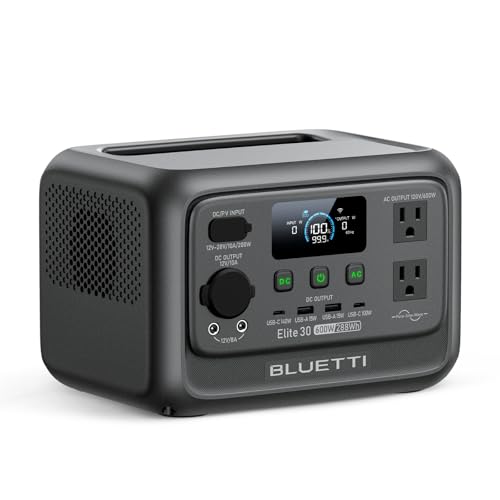 BLUETTI Elite 30 V2 | Best for a unit that mostly sits on a shelf | 288Wh 9.5 lb | $289.99 · View on Amazon |
| 2 | 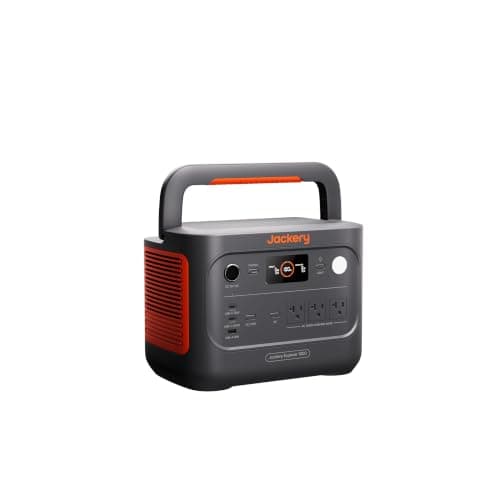 Jackery Explorer 1000 v2 | Best long-term value per pound | 1,070Wh 23.8 lb | $559.00 · View on Amazon |
| 3 |  Anker SOLIX C300 | Fastest top-up after a long gap | 288Wh 9.1 lb | Check price on Amazon |
There are two completely different questions hiding inside this one, and conflating them is why the answers online range from 'a few days' to 'a year'. The first is self-discharge: how fast the cells themselves leak charge. The second is standby draw: how much the unit's own electronics consume while sitting there. For every power station in this category, the second number is far larger than the first.
Self-discharge: a small number
A lithium iron phosphate cell at room temperature loses a low single-digit percentage of its charge per month through self-discharge — the chemistry's own internal leakage. On a 1,024Wh pack that is a few tens of watt-hours a month. Over six months on a shelf, cell self-discharge alone would take a full battery to somewhere comfortably above 80%.
Two things make it worse. Heat roughly doubles the rate for every substantial temperature rise, so a loft in summer is a much harsher store than a cupboard. And a very low starting charge leaves less margin before the pack reaches the voltage at which the management system shuts everything down to protect the cells — which is the state you do not want a stored battery to reach.
Standby draw: the number that actually empties it
| State left in | What is consuming | Rough time to empty |
|---|---|---|
| Fully off, all outputs off | Cell self-discharge only | Many months |
| Off but screen wakes on touch | Self-discharge plus a trickle | Several months |
| Wi-Fi or Bluetooth left on | Radio and controller | Weeks to a couple of months |
| DC or USB outputs left on | Port controllers | Weeks |
| AC inverter left on, nothing plugged in | Inverter idle draw | Days to a couple of weeks |
| AC inverter on with a phantom load | Inverter plus the device | Days |
The bottom two rows are how almost everybody who complains about a dead power station got there. An inverter idling with nothing attached is a real continuous load, because the inverter has to keep its output stage energised whether or not anything is drawing from it. Switch the AC output off and most of the problem disappears.
How to store one properly
- Charge to roughly 50-60%, not 100% and not empty. High state of charge accelerates calendar ageing; very low state of charge risks the pack drifting into the protection cut-off. Several manufacturers publish a specific storage percentage in the manual — use theirs if they give one.
- Switch everything off. AC output, DC and USB outputs, wireless, and then the unit itself. This is the step that turns weeks into months.
- Store cool and dry. Room temperature is ideal. An unheated garage in a cold climate and a loft in a hot one are the two worst common choices. No unit in this registry publishes a water-ingress rating, so damp is a real concern.
- Top up every three to six months. Set a recurring reminder. A unit that recharges in 50-70 minutes makes this painless, which is a good argument for the fast-charging picks above.
- Exercise it once or twice a year. Run it down to around 20-30% on real loads, then recharge. This keeps the management system's capacity estimate accurate.
Cold storage, specifically
Storing a unit below freezing is generally tolerable for the cells — it slows self-discharge, in fact — but you must not charge a lithium pack that is still below freezing, which is why most units block it. The failure people hit is grabbing a unit out of a cold garage and plugging it in. Bring it indoors, let it reach room temperature, then charge.
Power stations in cold weather has the full derate arithmetic and the warm-it-first routine, and it applies to winter storage as much as to winter use.
What this means for buying
If the unit is for emergencies and will spend most of its life waiting, the specifications to weigh are not capacity and output. They are cycle and lifespan ratings — because calendar ageing, not cycling, is what will finish it — and recharge speed, because a quarterly top-up that takes an hour gets done and one that takes a whole evening does not.
On the first of those, BLUETTI publishes over 3,000 cycles and a stated 10-year lifespan for the Elite 30 V2, and 3,500+ cycles to 80% for the AC180. EcoFlow and Anker publish 4,000 cycles to 80% on their 1kWh units. Jackery publishes 4,000 cycles to 70% on the Explorer 1000 v2, measured against a more forgiving threshold, and 500 cycles to 80%+ on the Explorer 300 — which is the one unit here where storage longevity is a genuine question. How long do portable power stations last covers the calendar-ageing side in full.
And if the unit is going to spend its life plugged in instead of stored, the advice reverses in one respect: keep it charged rather than at 50%, because a backup battery that is full is worth more than one that has been optimised. Can you leave a power station plugged in all the time covers that configuration.
The picks in full
1. Best for a unit that mostly sits on a shelf
BLUETTI Elite 30 V2
- 288Wh
- LiFePO4 (automotive-grade)
- 600W continuous / 1,500W surge
- 9.5 lb
- 200W
- Over 3,000 cycles; 10-year lifespan
- Full in 70 min
- 5 years
BLUETTI publishes over 3,000 cycles and, unusually, a stated 10-year lifespan for this model — which is the figure that matters for a unit bought for occasional use, because calendar ageing rather than cycle count is what ends most lightly-used batteries. Automotive-grade LiFePO4 cells is the chemistry claim behind it.
288Wh, 600W continuous, a 1,500W surge, a 70-minute full recharge, a switchover of 10 ms or less, 200W of solar input, nine output ports including USB-C PD 3.1 up to 140W and a 5-year warranty, all in 9.5 lb. A 70-minute recharge makes the quarterly top-up a trivial chore rather than an evening.
BLUETTI publishes no dimensions, no AC outlet count and no cycle-retention threshold for this model. 288Wh is electronics only, and it does not expand.
Reasons to buy
- Over 3,000 cycles; stated 10-year lifespan
- Automotive-grade LiFePO4 cells
- Full recharge in 70 minutes
- 9.5 lb — easy to store anywhere
- 5-year warranty
Reasons to avoid
- No dimensions or outlet count published
- No cycle-retention threshold published
- 288Wh — small loads only
- Not expandable
Buy it if: a unit bought for emergencies that mostly waits.
Skip it if: you will cycle it hard every week.
2. Best long-term value per pound
Jackery Explorer 1000 v2
- 1,070Wh
- LiFePO4 (LFP)
- 1,500W continuous / 3,000W surge
- 23.8 lb
- 400W
- 4,000 cycles to 70% capacity
- 1.7 hr wall; 1 hr emergency charge via app
- 5 years (with registration)
1,070Wh at 23.8 lb is 45.0Wh per pound, the best ratio in this registry, and Jackery publishes 4,000 cycles plus a 5-year warranty with registration. For a unit that lives in a cupboard between camping trips, light weight is what stops it becoming a unit that never comes out.
Also published: a 1.7-hour wall recharge, a one-hour emergency charge via the app, 1,500W continuous with a 3,000W surge, below 22 decibels in silent mode and a switchover under 20 ms. The app charge is genuinely useful for the pre-trip top-up.
Jackery quotes its 4,000 cycles to 70% capacity rather than the 80% threshold the other brands use, which makes the headline less impressive than it reads. 400W of solar input is the lowest in its class and it does not expand.
Reasons to buy
- 45.0Wh per pound at 23.8 lb
- 4,000 cycles; 5-year warranty with registration
- Full wall recharge in 1.7 hours
- One-hour emergency charge via the app
- Below 22 dB in silent mode
Reasons to avoid
- Cycle life quoted to 70%, not 80%
- 400W solar input
- Not expandable
- Two AC outlets
Buy it if: a cupboard unit that gets carried out a dozen times a year.
Skip it if: it will live permanently plugged in.
3. Fastest top-up after a long gap
Anker SOLIX C300
- 288Wh
- LFP (LiFePO4)
- 300W continuous / 600W surge
- 9.1 lb
- 100W
- 80% in 50 min
- 5 years
80% charge in 50 minutes is the fastest small-unit recharge in this registry, and for a stored unit that is the specification that matters — the quarterly top-up takes less than an hour, so it actually happens. 288Wh and 9.1 lb with a 10 ms switchover and LFP chemistry.
Anker publishes 300W continuous with a 600W SurgePad, 25dB at 3.3 ft, four USB-C ports up to 140W, 100W of solar input and a 5-year warranty.
Anker publishes no cycle-life rating and no dimensions for this model, and for a storage-focused purchase the missing cycle rating is a genuine gap — it is the number that tells you how long the unit will still be worth topping up.
Reasons to buy
- 80% recharge in 50 minutes
- 9.1 lb — stores anywhere
- LFP chemistry; 5-year warranty
- 10 ms UPS switchover
- Four USB-C ports up to 140W
Reasons to avoid
- No cycle-life rating published
- No published dimensions
- 300W continuous
- 100W maximum solar input
Buy it if: a unit you will remember to top up because it is quick.
Skip it if: you need a published longevity figure before buying.
Questions