Can You Leave a Power Station Plugged In All the Time?
Yes, and on a LiFePO4 unit with a charge limit it is barely a compromise. Here is what permanent charging actually costs the battery.
The short answer
Yes. Every unit in this site's registry is designed to be left connected to mains power indefinitely — that is what UPS and pass-through modes are for, and the battery management system stops charging when the pack is full rather than trickling into it. The one real cost is calendar ageing: a lithium cell held at 100% state of charge degrades a little faster than one held around 60-80%, regardless of how little it is cycled. If your unit has a charge-limit or storage-mode setting, cap it at 80-90% and the compromise mostly disappears. If it does not, leaving it plugged in is still the right call for a backup unit.
At a glance
Quick picks
Tap any row to jump to the full write-up. Weight is a column here because it is the spec that decides whether you actually carry the thing.
| # | Product | Best for | Capacity · Weight | Price |
|---|---|---|---|---|
| 1 | 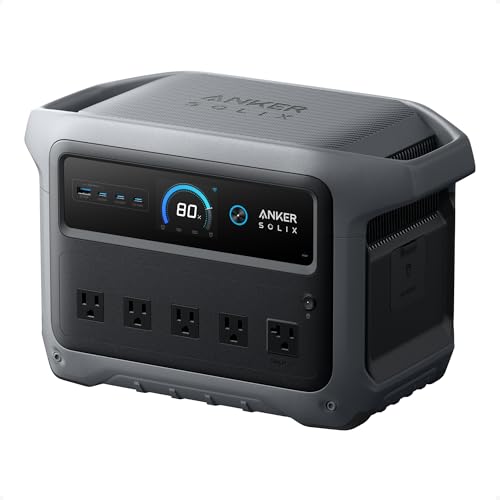 Anker SOLIX C1000 Gen 2 | Best for a permanent desk installation | 1,024Wh 24.9 lb | $529.99 · View on Amazon |
| 2 | 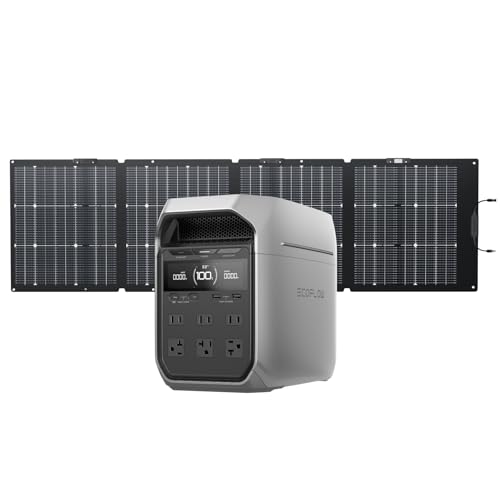 EcoFlow DELTA 3 Plus | Fastest published switchover | 1,024Wh 27.6 lb | Check price on Amazon |
| 3 |  Anker SOLIX C300 | Best small always-on unit | 288Wh 9.1 lb | Check price on Amazon |
The worry behind this question is a real one and it comes from phones: everybody has been told not to leave a phone charging overnight, and the instinct transfers. It should not, for two reasons. Modern power stations stop charging when full rather than holding the pack at a trickle, and the chemistry in almost all of them is far more tolerant of a high state of charge than the cells in a phone.
What happens when the pack is full
The battery management system takes the charger out of the circuit. The unit then sits there with the pack at its target voltage, drawing a small amount of mains power to run its own electronics — the display, the Bluetooth or Wi-Fi radio, and the inverter if it is switched on. Nothing is being pushed into the cells.
If the unit is in UPS or pass-through mode, something more useful is happening: whatever is plugged into the outlets is being supplied from the mains through the unit, and the battery sits in reserve. When the grid drops, the inverter picks up the load in the published switchover time. Pass-through charging explained covers how this works and where the modes differ by brand.
The one real cost: calendar ageing
Lithium cells lose capacity two ways. Cycle ageing comes from charging and discharging, and it is what the 3,000-4,000 cycle ratings describe. Calendar ageing happens regardless of use, and it is faster when the cell is held at a high state of charge and at a high temperature. A unit left permanently at 100% in a warm room is in the worst corner of that for calendar ageing, even though it is in the best corner for cycle ageing — because it is barely cycling at all.
| Mechanism | Driven by | Left plugged in at 100% | Left plugged in at 80% |
|---|---|---|---|
| Cycle ageing | Charge and discharge cycles | Minimal — almost no cycling | Minimal |
| Calendar ageing | State of charge and temperature | Fastest case | Noticeably slower |
| Published cycle ratings | - | 3,000-4,000 to 80% across the registry | Same |
The practical conclusion is unglamorous: leaving a unit plugged in trades a little calendar ageing for a lot of cycle ageing you avoid, and for a backup unit that is a good trade. A power station that is permanently charged is a power station that works when the power goes out, and a power station kept at a theoretically optimal 60% is one that gives you 40% less when you need it.
What to actually do
- Use the charge limit if there is one. Most units in this class let you cap charging at a percentage in the app or on the panel. 80-90% is the sensible setting for an always-plugged-in unit: you keep nearly all the capacity and remove the worst of the calendar ageing.
- Turn UPS or pass-through mode on if the point is to protect equipment. Plugged in with the mode off, the unit is just a charged battery in the corner; with it on, it is an uninterruptible supply.
- Leave the AC inverter off if nothing is plugged into the AC outlets. The inverter has a standby draw of its own, and on a small unit that idle consumption can empty a battery over days even with nothing attached.
- Keep it cool. Temperature is the other half of calendar ageing. Room temperature on a hard surface with the vents clear is ideal; on top of a radiator or in a sunny window is not.
- Exercise it occasionally. Once every month or two, run it down to somewhere around 20-30% on real loads and charge it back. This keeps the management system's capacity estimate honest, which is why a unit that has sat at 100% for a year sometimes reports oddly.
What about electricity cost?
Small but not nothing. A unit sitting full with its screen asleep and the inverter off draws a few watts; with the inverter on and nothing plugged in, more. Over a year a handful of watts is a few kilowatt-hours — negligible on a household bill, but worth knowing if you are leaving several units plugged in or running one in a van off a limited supply.
If the unit is powering something through pass-through, you are also paying a small conversion penalty: mains goes in, gets converted, comes out. That is the price of the switchover protection and it is the same trade any UPS makes.
When you should not leave it plugged in
- If it is going into storage for months. Then the advice reverses: charge to somewhere around 50-60%, switch everything off, and store it somewhere cool and dry. How long does a power station hold its charge covers storage properly.
- If the unit, the cable or the socket runs hot. Warm is normal while charging fast; hot is a reason to stop and investigate.
- If the unit has been damaged. A cracked case, a hard drop, swelling, or a unit that has been wet should not be left charging unattended, or at all. Are portable power stations safe indoors covers that properly.
- On a questionable extension lead or a daisy-chained strip. A unit drawing 1,300-1,600W while recharging is a real load; give it a wall socket and a cord rated for it.
The setups this question usually comes from
A home office or desk. This is the best use of a permanently-plugged-in unit and the one where switchover time earns its keep. Power station as a UPS for wifi and router is the setup guide, and can a power station run a PC covers the desktop case where switchover matters more than capacity.
Standby for outages. Plug it in, cap the charge at 80-90%, turn pass-through on for the fridge or the router, and forget about it. Best portable power stations for home backup and best power station for an apartment cover the unit choice.
Medical or sleep equipment. Permanently plugged in with pass-through on is exactly the right configuration, and switchover is the specification to buy on rather than capacity. Best power station for an oxygen concentrator and best power station for CPAP camping both cover it — and in both cases the device's own manual is the authority, not a power station's spec sheet.
The picks in full
1. Best for a permanent desk installation
Anker SOLIX C1000 Gen 2
- 1,024Wh
- LiFePO4 (InfiniPower LFP)
- 2,000W continuous / 3,000W surge
- 24.9 lb
- 600W
- 80% capacity after 4,000 cycles
- Full in 49 min (UltraFast, 1,600W max input)
- 5 years
A 10 ms UPS switchover and 80% capacity after 4,000 cycles. The switchover figure is what makes a permanently-plugged-in unit useful rather than merely charged: when the grid drops, the computer, the router and the monitor do not notice. The cycle rating is what makes it a sensible thing to leave there for years.
Anker publishes 1,024Wh of LiFePO4 InfiniPower cells, 2,000W continuous, a 3,000W surge, a full recharge in 49 minutes at 1,600W input, 600W of solar input, a 5-year warranty and dimensions of 15.12 x 8.19 x 9.61 in. 2,000W means the unit can carry a whole desk rather than just the essentials.
Two AC outlets is the constraint for an always-on desk setup and a power strip is the fix. It does not expand, so 1,024Wh is the ceiling — about two to three days of a router and modem, or several hours of a full workstation.
Reasons to buy
- 10 ms UPS switchover
- 80% capacity after 4,000 cycles
- 2,000W continuous, 3,000W surge
- Full recharge in 49 minutes
- LiFePO4 cells; 5-year warranty
Reasons to avoid
- Only two AC outlets
- Not expandable
- 600W solar input
Buy it if: a workstation you want protected permanently.
Skip it if: you need more than two mains sockets.
2. Fastest published switchover
EcoFlow DELTA 3 Plus
- 1,024Wh
- LFP (LiFePO4)
- 1,800W continuous / 3,600W surge
- 27.6 lb
- 1000W
- 4,000 cycles to 80%+ capacity
- Full in 56 min (1,500W AC input)
- 5 years
A switchover under 10 ms is the fastest figure published across this registry, and six AC outlets means the unit can genuinely replace the power strip under a desk rather than sitting beside it. For an always-plugged-in installation, outlet count is the specification that decides how much the thing actually protects.
EcoFlow publishes 1,024Wh of LFP cells, 1,800W continuous, a 3,600W surge, two 140W USB-C ports, a 56-minute full recharge, 4,000 cycles to 80%+ capacity, expansion to 5 kWh and a 5-year warranty.
The 1,000W solar input is money spent on a capability an indoor unit will not use. 27.6 lb and 37.1Wh per pound is unremarkable, though irrelevant for something that never moves.
Reasons to buy
- Switchover under 10 ms — fastest published here
- Six AC outlets
- 4,000 cycles to 80%+ capacity
- Expands to 5 kWh
- Two 140W USB-C ports
Reasons to avoid
- 1,000W solar input wasted indoors
- 27.6 lb
- 1,800W continuous, not 2,000W
Buy it if: protecting several devices from one unit.
Skip it if: two sockets is all you need and you want to pay less.
3. Best small always-on unit
Anker SOLIX C300
- 288Wh
- LFP (LiFePO4)
- 300W continuous / 600W surge
- 9.1 lb
- 100W
- 80% in 50 min
- 5 years
288Wh and 9.1 lb with a 10 ms UPS switchover and 300W continuous. For the loads most people actually want protected round the clock — a router, a modem, a CPAP, a desk lamp, a phone — this is the right size, and leaving a small LiFePO4 unit plugged in costs very little in either electricity or degradation.
Anker publishes LFP chemistry, 80% recharge in 50 minutes, 25dB at 3.3 ft, a 5-year warranty, 600W SurgePad output and seven device ports including four USB-C up to 140W. 25dB is quiet enough to sit on a desk permanently.
Anker publishes no cycle-life rating and no dimensions for this model, which for a unit you intend to keep for years is the gap you would most want filled. 300W continuous rules out appliances.
Reasons to buy
- 9.1 lb and 25dB — lives on a desk
- 10 ms UPS switchover
- 80% recharge in 50 minutes
- Four USB-C ports up to 140W
- LFP chemistry; 5-year warranty
Reasons to avoid
- No cycle-life rating published
- 300W continuous — electronics only
- No published dimensions
- 100W maximum solar input
Buy it if: a router, a modem and a CPAP, permanently.
Skip it if: you want to protect a desktop computer and monitors.
Questions