Best Power Station for a Home Office
If the power cut ends your meeting, capacity was never the problem. Ranked on published switchover time, outlet count and a realistic eight-hour desk load.

At a glance
Quick picks
Tap any row to jump to the full write-up. Weight is a column here because it is the spec that decides whether you actually carry the thing.
| # | Product | Best for | Capacity · Weight | Price |
|---|---|---|---|---|
| 1 | 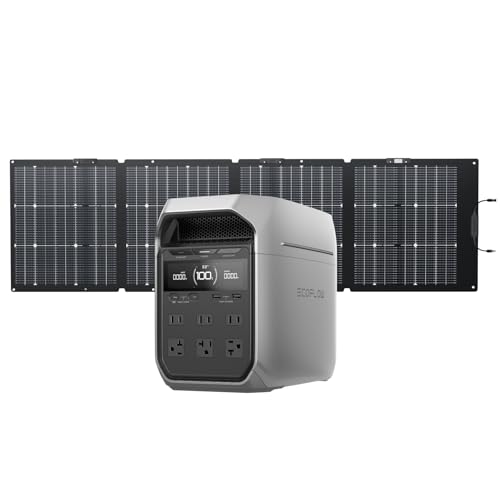 EcoFlow DELTA 3 Plus | Best all-round desk UPS | 1,024Wh 27.6 lb | Check price on Amazon |
| 2 | 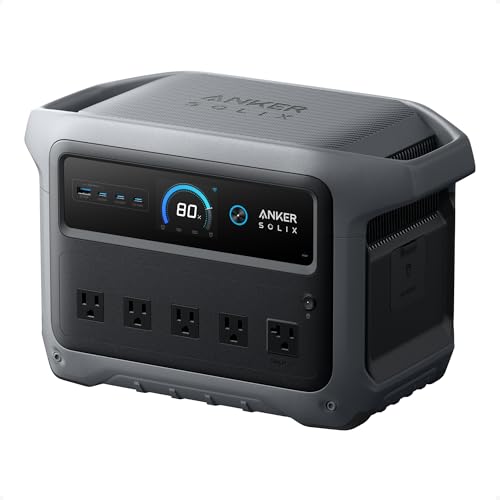 Anker SOLIX C1000 Gen 2 | Best for a power-hungry workstation | 1,024Wh 24.9 lb | $529.99 · View on Amazon |
| 3 |  Anker SOLIX C300 | Best small unit for a laptop desk | 288Wh 9.1 lb | Check price on Amazon |
| 4 | 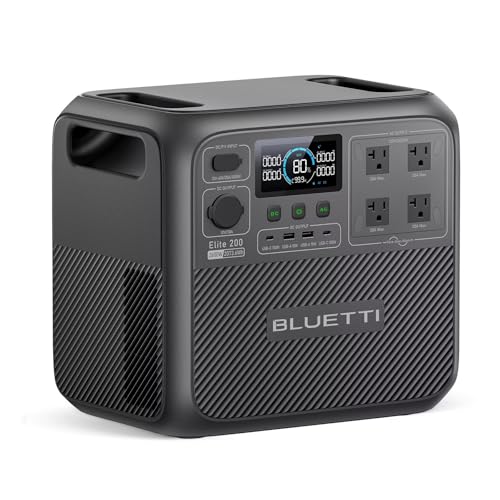 BLUETTI Elite 200 V2 | Best for a full working day off-grid | 2,074Wh 53.4 lb | $898.99 · View on Amazon |
For a home office the specification that matters is switchover time, not capacity. A desktop PC drops out and reboots if the supply is interrupted for more than a few milliseconds, and a reboot in the middle of a call costs you the call whether the battery behind it holds ten minutes or ten hours. Buy a published switchover figure first, then size the capacity for how long you actually need to keep working.
What a desk actually draws
Less than people assume, and the gap between a laptop desk and a desktop desk is the whole story. Read the labels on your own equipment - a power supply publishes its rated output, which is a ceiling rather than a draw - and use the bands below only to check your own figures look sane.
| Equipment | Typical nameplate band | 8 hours at the midpoint |
|---|---|---|
| Laptop (via charger) | 45-100W | 580Wh |
| Mini PC | 20-65W | 340Wh |
| Desktop PC, office work | 60-150W | 840Wh |
| Desktop PC, heavy load | 200-500W | 2,800Wh |
| 27 in monitor | 20-45W | 260Wh |
| Router and modem | 10-20W | 120Wh |
| Desk lamp, LED | 6-12W | 72Wh |
| Laser printer, printing | 300-900W | Short bursts only |
Switchover time, and who needs 10 ms
A power supply holds its output for a brief moment after its input disappears, using the energy stored in its capacitors. If the battery takes over inside that window, the computer never knows. If it does not, the machine resets. The published figures in our registry run from 10 ms to 20 ms, and the units that publish nothing at all are the ones to avoid for this job.
- 10 ms, published: Anker SOLIX C1000 Gen 2, Anker SOLIX C300, Anker SOLIX C2000 Gen 2, BLUETTI Elite 30 V2 (10 ms or less), EcoFlow DELTA 3 and DELTA 3 Plus (under 10 ms).
- 15-20 ms, published: BLUETTI Elite 200 V2 (15 ms or less), BLUETTI AC180 (20 ms), EcoFlow DELTA 2 Max (under 20 ms), Jackery Explorer 1000 v2 (under 20 ms).
- Not published: Anker SOLIX C1000, Anker SOLIX F3800, EcoFlow DELTA Pro 3, EcoFlow RIVER 3 Plus, Jackery Explorer 300, Jackery Explorer 2000 v2. For a desk that must not drop out, treat a missing figure as a no.
A monitor, a router and a laptop all tolerate a longer gap than a desktop does - a laptop has its own battery and does not care at all. So the strict 10 ms requirement applies to exactly one thing on most desks: the tower. Can a power station run a PC works through that in detail, including why a power supply's wattage rating is a poor guide to its draw.
Set it up as pass-through, not as a spare
The arrangement that works is the unit plugged into the wall permanently, with the desk plugged into the unit. Mains flows through to the equipment and keeps the pack topped up; when the mains goes, the inverter takes over inside its published switchover window and nothing on the desk notices. A unit sitting in a cupboard at 40% charge is not a UPS, it is a project for after the outage.
Two follow-up questions come straight out of that setup, and both have their own pages: pass-through charging explained covers what running mains through the unit does and does not cost, and can you leave a power station plugged in all the time answers the one everybody asks - yes, and a charge limit at 80-90% removes most of what it costs the battery. Power station as a UPS for wifi and router is the minimal version of this whole setup, for a desk where only the connection has to survive.
The picks in full
1. Best all-round desk UPS
EcoFlow DELTA 3 Plus
- 1,024Wh
- LFP (LiFePO4)
- 1,800W continuous / 3,600W surge
- 27.6 lb
- 1000W
- 4,000 cycles to 80%+ capacity
- Full in 56 min (1,500W AC input)
- 5 years
A switchover under 10 ms and six AC outlets. Those two specifications are the whole job: the first means a desktop PC, a monitor and a router carry on through a cut without rebooting, and the second means you are not choosing which three of them to protect.
EcoFlow publishes 1,024Wh, 1,800W continuous with a 3,600W surge, 2,200W available through X-Boost, 1,000W of maximum solar input across two MPPT inputs, a 56-minute wall recharge at 1,500W, 4,000 cycles to 80%+ capacity, a 5-year warranty, expansion to 5 kWh and 27.6 lb. Two USB-C ports at 140W each run a pair of laptops with the inverter off.
27.6 lb and roughly 15.7 x 8.0 x 11.2 in means this lives under the desk permanently rather than moving around, which is the right arrangement anyway. If you will never attach a panel, the plain DELTA 3 is the same unit with a 500W solar ceiling.
Reasons to buy
- Switchover under 10 ms
- Six AC outlets; two 140W USB-C ports
- 1,024Wh, expandable to 5 kWh
- 4,000 cycles to 80%+; 5-year warranty
- 1,000W solar input
Reasons to avoid
- 27.6 lb - a permanent installation
- Fan runs on fast charge
- Panel ceiling is wasted if you never add one
Buy it if: a full desk - PC, two monitors, router, lamp.
Skip it if: you want something that also goes camping.
2. Best for a power-hungry workstation
Anker SOLIX C1000 Gen 2
- 1,024Wh
- LiFePO4 (InfiniPower LFP)
- 2,000W continuous / 3,000W surge
- 24.9 lb
- 600W
- 80% capacity after 4,000 cycles
- Full in 49 min (UltraFast, 1,600W max input)
- 5 years
2,000W continuous with a 3,000W surge and a published 10 ms switchover. If the desk has a gaming or workstation PC on it - a machine whose power supply is rated at 850W or more and which spikes hard under load - this is the unit on this page with the output margin to not care.
Anker publishes 1,024Wh, a full recharge in 49 minutes at 1,600W input, 600W of maximum solar input, 80% capacity after 4,000 cycles, a 5-year warranty, 24.9 lb and dimensions of 15.12 x 8.19 x 9.61 in. A 140W USB-C port and two USB-A ports handle the peripherals.
Two AC outlets is the catch for a desk, and here a power strip is genuinely the answer - one strip into one socket covers the whole workstation, and the second socket stays free for a monitor. The 49-minute recharge means a morning outage does not write off the afternoon.
Reasons to buy
- 2,000W continuous, 3,000W surge
- 10 ms published switchover
- Full recharge in 49 minutes
- 4,000 cycles to 80%; 5-year warranty
- 24.9 lb; published dimensions
Reasons to avoid
- Two AC outlets - needs a strip
- Not expandable
- 600W solar input
Buy it if: a workstation or gaming PC that spikes hard.
Skip it if: you need four or more sockets directly on the unit.
3. Best small unit for a laptop desk
Anker SOLIX C300
- 288Wh
- LFP (LiFePO4)
- 300W continuous / 600W surge
- 9.1 lb
- 100W
- 80% in 50 min
- 5 years
288Wh at 9.1 lb with a published 10 ms switchover, and four USB-C ports - 140W, 100W, 20W and 15W. For a laptop-and-monitor desk this is the right size of answer, and the 140W port runs the laptop directly with the inverter never switching on at all.
Anker publishes 300W of AC with a 600W SurgePad peak, 80% charge in 50 minutes, 100W of maximum solar input, two 12W USB-A ports, a 120W car socket, 25dB at 3.3 ft and a 5-year warranty. A quiet unit under a desk is worth more than it sounds when you are on calls all day.
300W of AC rules out a desktop PC and a laser printer. Anker publishes no cycle-life rating, no dimensions and no AC outlet count for this model, which is three blanks on an otherwise unusually complete specification.
Reasons to buy
- 10 ms switchover at 9.1 lb
- Four USB-C ports including 140W
- 80% charge in 50 minutes
- 25dB at 3.3 ft published
- 5-year warranty
Reasons to avoid
- 288Wh and 300W AC - laptops only
- No published cycle life or dimensions
- 100W solar input
Buy it if: a laptop, a monitor, a router and a lamp.
Skip it if: there is a desktop tower under the desk.
4. Best for a full working day off-grid
BLUETTI Elite 200 V2
- 2,074Wh
- LiFePO4 (LFP), automotive-grade cells
- 2,600W continuous / 3,900W surge
- 53.4 lb
- 1000W
- 6,000+ cycles to 80% capacity
- Full in 1.4 hr (1,800W AC input)
- 5 years
2,074Wh behind 2,600W continuous - the highest continuous output in the 2 kWh class - with a switchover of 15 ms or less. This is the unit for a day when the power is not coming back: a full desk at 150W runs for eleven hours on this pack and still has something left.
BLUETTI publishes 6,000+ cycles to 80% capacity, which is comfortably the longest cycle rating in our registry and the specification that matters most for a unit cycling every day as a UPS. Also a 1.4-hour full charge at 1,800W of AC input, 1,000W of maximum solar input, a 5-year warranty, 53.4 lb and dimensions of 13.78 x 9.84 x 12.74 in.
15 ms is slower than the 10 ms units above, and for most desk equipment that is still invisible - but it is the one specification where this unit is not class-leading. Its expansion story is also unclear: BLUETTI sells an Elite 200 V2 with a B500K pack while its own FAQ for the model says it does not support the B80, B230 or B300.
Reasons to buy
- 2,074Wh - a full day at a desk
- 6,000+ cycles to 80% - longest here
- 2,600W continuous
- 1,000W solar input; 1.4 hr full charge
- 5-year warranty
Reasons to avoid
- 15 ms switchover, not 10 ms
- 53.4 lb
- Expansion compatibility unclear
Buy it if: working through a long outage, not just riding it out.
Skip it if: you only need the first ten minutes covered.
Questions