Best Power Stations with UPS Mode
Every maker says its unit does UPS. Only some of them publish the millisecond figure that decides whether your computer notices the cut.

At a glance
Quick picks
Tap any row to jump to the full write-up. Weight is a column here because it is the spec that decides whether you actually carry the thing.
| # | Product | Best for | Capacity · Weight | Price |
|---|---|---|---|---|
| 1 | 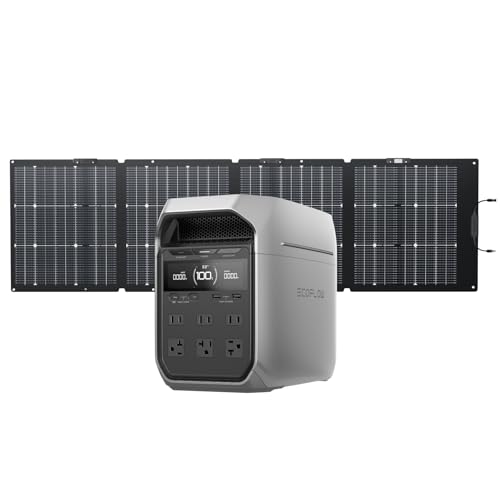 EcoFlow DELTA 3 Plus | Best UPS overall | 1,024Wh 27.6 lb | Check price on Amazon |
| 2 | 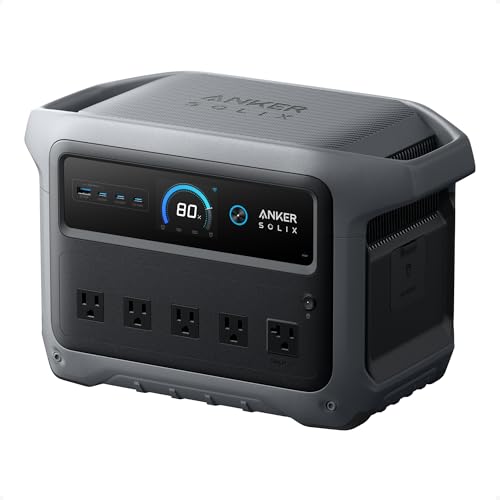 Anker SOLIX C1000 Gen 2 | Best UPS for hard-start loads | 1,024Wh 24.9 lb | $529.99 · View on Amazon |
| 3 | 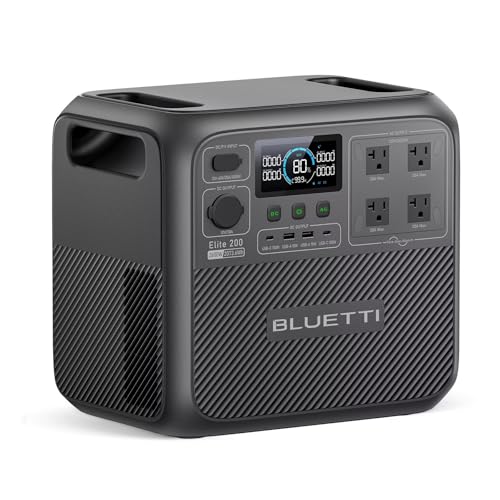 BLUETTI Elite 200 V2 | Best UPS for an outage that lasts | 2,074Wh 53.4 lb | $898.99 · View on Amazon |
| 4 |  Anker SOLIX C300 | Best small UPS for a desk or a router | 288Wh 9.1 lb | Check price on Amazon |
UPS mode is one number, and plenty of makers do not publish it
Strip away the marketing and UPS mode is a single specification: how many milliseconds the unit takes to pick up the load when the mains disappears. The unit sits between the wall and your equipment, passing mains through and keeping its own battery topped up. When the supply drops, an internal relay flips and the inverter takes over. The time that relay takes is the whole product. Under about 20 ms and nearly all consumer electronics ride through without noticing; above that and devices start rebooting.
What makes this a buying decision rather than a technicality is that several manufacturers publish no figure at all. Jackery does not publish a switchover time for the Explorer 2000 v2 or the Explorer 300. EcoFlow does not publish one for the RIVER 3 Plus. Anker does not publish one for the original C1000 or the F3800. Those units may well switch over perfectly well — but an unpublished specification is not a specification, and this page ranks only units whose makers have committed to a number in writing. Pass-through charging explained covers why pass-through and UPS mode are two different features that get sold under one name, which is the confusion this page exists to clear up.
How we ranked these
Four criteria in this order, and every figure is the manufacturer's own published number read from the pages listed at the foot of this page. We have not measured a switchover ourselves and do not claim to have — how we choose sets out what that means.
- Published switchover time. The defining specification. A unit with no published figure does not appear on this page, regardless of how good it is at everything else.
- Outlet count behind the battery. A UPS that protects one device is a different product from one that protects a desk. Six AC outlets and two AC outlets are not a detail — they decide whether you need a power strip in front of the thing you are protecting.
- Continuous output and surge. This is what separates a power station from a desktop UPS. A 1,800W or 2,600W inverter can carry a fridge, a freezer or a sump pump through a cut; a conventional UPS cannot come close.
- Capacity and cycle life. A UPS cycles far more often than a camping battery, because every brownout is a cycle. Capacity decides how long the cut can last; cycle life decides how many years of cuts the unit survives.
Every published switchover figure in our registry
| Unit | Switchover | AC continuous | Capacity |
|---|---|---|---|
| EcoFlow DELTA 3 Plus | Under 10 ms | 1,800W | 1,024Wh |
| EcoFlow DELTA 3 | Under 10 ms | 1,800W | 1,024Wh |
| Anker SOLIX C1000 Gen 2 | 10 ms | 2,000W | 1,024Wh |
| Anker SOLIX C2000 Gen 2 | 10 ms | 2,400W | 2,048Wh |
| Anker SOLIX C300 | 10 ms | 300W | 288Wh |
| BLUETTI Elite 30 V2 | 10 ms or less | 600W | 288Wh |
| BLUETTI Elite 200 V2 | 15 ms or less | 2,600W | 2,074Wh |
| BLUETTI AC180 | 20 ms | 1,800W | 1,152Wh |
| EcoFlow RIVER 2 Pro | Under 30 ms | 800W | 768Wh |
| EcoFlow DELTA 2 Max | Under 20 ms | 2,400W | 2,048Wh |
| Jackery Explorer 1000 v2 | Under 20 ms | 1,500W | 1,070Wh |
| EcoFlow RIVER 3 Plus | Not published | 600W | 286Wh |
| Jackery Explorer 2000 v2 | Not published | 2,200W | 2,042Wh |
| Jackery Explorer 300 | Not published | 300W | 293Wh |
| Anker SOLIX F3800 | Not published | 6,000W | 3,840Wh |
The spread among the units that do publish a figure is 10 ms to 30 ms, and the practical consequence of that spread is narrower than it looks. Below 20 ms almost nothing in a home notices. The one category where the difference genuinely bites is older desktop computers and equipment with tightly specified power supplies, where a 20-30 ms gap can occasionally cause a reset. If that is your protected load, buy from the top of this table. If it is a router, a modem, a television or a fridge, anything published here will do the job.
What a power station in UPS mode does that a desktop UPS cannot
- It runs for hours rather than minutes. A typical desktop UPS holds enough to shut a computer down safely. A 1 kWh power station holds roughly fifty times that, which turns a save-your-work device into a keep-working device.
- It carries real appliances. 1,800W or 2,600W of inverter will run a refrigerator, a freezer, a sump pump or a furnace blower through a cut. No consumer desktop UPS will. Best power station for a sump pump covers the hard-start version of that job properly.
- It leaves the house with you. The same unit goes camping, to a tailgate or into a van. A desktop UPS lives under a desk forever. Best power station for home and camping is the page for buyers who want both jobs from one purchase.
- It recharges from solar. Three of the four picks above accept between 600W and 1,000W of panel, which means a multi-day outage does not end when the battery does.
And the honest other side of that list: a desktop UPS does one thing these do not. True double-conversion models rebuild the waveform continuously, so there is no switchover at all and the protected equipment sees perfectly clean power regardless of what the grid is doing. For medical equipment, lab instruments or a server you cannot afford to drop, that is still the right tool. Portable power station vs UPS is the fair version of that argument, and it does not come out entirely in our favor.
How to set one up as a UPS without wrecking the battery
- Plug the unit into the wall, then plug your equipment into the unit. That is the whole wiring job. There is no transfer switch and nothing hard-wired — if the setup you have in mind needs either, you are in best power station for a sump pump territory and should read that first.
- Turn UPS or EPS mode on in the app. On most of these units the fast switchover is a setting rather than the default behavior, and leaving it off means the relay runs in its slower standard mode.
- Set a charge limit if the app offers one. Lithium cells age fastest when held near 100% at room temperature, and a unit left permanently on mains sits there by definition. A ceiling of 80-90% costs you a little runtime and buys back real calendar life.
- Keep it out of a sealed cabinet. All of these units run a fan under load, and a UPS that trickles constantly generates a little heat all day. Anker quotes 25 dB for the C300 and EcoFlow quotes up to 62 dB for the RIVER 2 Pro, so the noise varies hugely by model — are portable power stations loud has the published figures.
- Size it for the cut you actually get. A fifteen-second brownout needs almost no battery. A four-hour outage with a fridge on it needs over a kilowatt-hour. What size power station for a power outage does that arithmetic with your own numbers.
If the protected load is only a router and a modem, power station as a UPS for wifi and router does that single-purpose arithmetic and may well talk you into a smaller purchase than this page. If you want the whole-outage version instead, best portable power stations for home backup covers it, and best power stations under $300 covers the cheapest end of the small-UPS idea.
The picks in full
1. Best UPS overall
EcoFlow DELTA 3 Plus
- 1,024Wh
- LFP (LiFePO4)
- 1,800W continuous / 3,600W surge
- 27.6 lb
- 1000W
- 4,000 cycles to 80%+ capacity
- Full in 56 min (1,500W AC input)
- 5 years
The fastest published switchover in our registry, attached to the most useful set of outlets. EcoFlow publishes under 10 ms for the DELTA 3 Plus, which means a desktop computer, a modem, a router, a television, a games console or a network switch rides straight through a mains cut without resetting. Six AC outlets is what turns that into a whole-desk solution rather than a single-device one: a tower, a monitor, a router and a lamp all sit behind the battery at once, which is exactly what a conventional desktop UPS cannot do at this price.
1,800W continuous with a 3,600W surge is enough inverter to cover a hard-start load behind the same unit — a sump pump, a freezer, a small compressor — which a desktop UPS will never do. EcoFlow publishes 1,024Wh, LFP cells, 4,000 cycles to 80%+ capacity, a full recharge in 56 minutes at 1,500W AC input, 1,000W of solar across two MPPT inputs, and expansion to 5 kWh with extra batteries. That expansion path is the difference between a UPS that covers a blink and one that covers an afternoon.
The honest limits. At 27.6 lb it is the heaviest 1 kWh unit in the registry, which is irrelevant if it lives under a desk and annoying if it does not. The 1,000W solar figure is two 500W inputs combined, not one, so you need the right panel arrangement to reach it. And running a unit permanently plugged in as a UPS keeps the battery at a high state of charge, which is the condition lithium cells like least — set a charge limit in the app if you intend to leave it on mains forever.
Reasons to buy
- Under 10 ms switchover — the fastest published figure here
- Six AC outlets, so a whole desk sits behind the battery
- 1,800W continuous, 3,600W surge
- Full recharge in 56 minutes; expands to 5 kWh
- 4,000 cycles to 80%+, 5-year warranty
Reasons to avoid
- 27.6 lb — the heaviest 1 kWh unit in our registry
- The 1,000W solar ceiling is two 500W inputs combined
- Permanently on mains keeps cells at a high state of charge
- No double-conversion: this is a transfer switch, not a true online UPS
Buy it if: a desk, a rack or a media cabinet that must not blink.
Skip it if: you need certified zero-interruption power for lab equipment.
2. Best UPS for hard-start loads
Anker SOLIX C1000 Gen 2
- 1,024Wh
- LiFePO4 (InfiniPower LFP)
- 2,000W continuous / 3,000W surge
- 24.9 lb
- 600W
- 80% capacity after 4,000 cycles
- Full in 49 min (UltraFast, 1,600W max input)
- 5 years
A published 10 ms switchover behind the widest appliance envelope per pound on this site. Anker publishes 2,000W of continuous AC with a 3,000W surge out of a 24.9 lb box — 200W more continuous output than the EcoFlow and nearly three pounds lighter. If the thing you are protecting is not a computer but an appliance with a motor in it, that continuous figure is what decides whether it runs at all, and 10 ms is quick enough that a fridge compressor never registers the handover.
1,024Wh of LFP, 4,000 cycles to 80% capacity, a full recharge in 49 minutes at 1,600W input, 600W of solar and a five-year warranty. Forty-nine minutes is the fastest refill in the 1 kWh class, which matters for a UPS specifically: after a long cut you want the unit back at full before the next one. The published footprint of 15.12 x 8.19 x 9.61 in is also the most compact in its class, which is the specification that decides whether it fits under a desk or in a media cabinet.
The limits are real. Two AC outlets, against six on the EcoFlow — for a desk with a tower, a monitor, a router and a modem you are adding a power strip, which works but puts a single point of failure in front of the battery. It does not expand, so 1,024Wh is the whole plan. And 600W of solar is modest for the class if you ever intend to run this off-grid rather than on mains.
Reasons to buy
- 10 ms published switchover
- 2,000W continuous, 3,000W surge — covers motor loads
- 24.9 lb and the most compact footprint in its class
- Full recharge in 49 minutes, the fastest in the 1 kWh class
- 4,000 cycles to 80%, 5-year warranty
Reasons to avoid
- Only two AC outlets — a desk setup needs a power strip
- Not expandable; 1,024Wh is permanent
- 600W solar ceiling is modest for the class
- Same high-state-of-charge caveat as any always-on UPS
Buy it if: the protected load has a motor or a compressor in it.
Skip it if: you need more than two things plugged in directly.
3. Best UPS for an outage that lasts
BLUETTI Elite 200 V2
- 2,074Wh
- LiFePO4 (LFP), automotive-grade cells
- 2,600W continuous / 3,900W surge
- 53.4 lb
- 1000W
- 6,000+ cycles to 80% capacity
- Full in 1.4 hr (1,800W AC input)
- 5 years
A switchover of 15 ms or less, in front of the largest battery here. 2,073.6Wh is roughly double the 1 kWh units, which changes what UPS mode means in practice: instead of covering a blink and giving you time to save your work, it covers an evening with the router, the desk and the fridge still running. 2,600W of continuous output is the highest AC rating in our registry below the big home units, so there is very little a household circuit can ask of it that it cannot carry.
BLUETTI publishes automotive-grade LiFePO4 cells, 6,000+ cycles to 80% capacity — the longest longevity claim on this site by 50% — 1,000W of solar input, a 1.4-hour full recharge at 1,800W and a five-year warranty. Cycle life deserves special weight on a UPS: a unit that lives permanently on mains and cycles on every brownout racks up cycles faster than a camping battery ever will, and 6,000 is the figure that makes that lifestyle survivable.
The costs. 15 ms is slower than the 10 ms figures above, which is almost certainly still fine for a computer but is a published difference and we are not going to pretend otherwise. 53.4 lb is 38.8 watt-hours per pound, the worst ratio in our registry — this unit does not move once it is placed. The 3,900W Power Lifting figure applies to resistive loads only, so do not read it as motor surge headroom. And BLUETTI's own guidance on which expansion packs fit this model is contradictory; confirm the pack before you buy one.
Reasons to buy
- 2,073.6Wh — roughly double the 1 kWh units here
- 2,600W continuous, the highest in our registry below the home units
- 6,000+ cycles to 80% — the longest claim on this site
- 1,000W solar input; full in 1.4 hours
- 5-year warranty
Reasons to avoid
- 15 ms or less, slower than the 10 ms units here
- 53.4 lb — it does not move once placed
- 3,900W lifting figure is resistive-load only
- BLUETTI's expansion guidance for this model is contradictory
Buy it if: the cut might last hours, not milliseconds.
Skip it if: the unit has to move, or you want the fastest switchover.
4. Best small UPS for a desk or a router
Anker SOLIX C300
- 288Wh
- LFP (LiFePO4)
- 300W continuous / 600W surge
- 9.1 lb
- 100W
- 80% in 50 min
- 5 years
A 10 ms switchover in 9.1 lb, which is the combination almost nothing else offers. Most units that publish a fast switchover are 25-pound boxes; this one sits on a shelf behind a router, weighs less than a cat, and hands over as fast as units three times its size. For the single most common version of this job — keep the internet alive through the cuts, so the work call survives and the cameras keep recording — it is the right-sized tool rather than an oversized one.
288Wh of LFP behind a 300W inverter, 80% charge in 50 minutes, 100W of solar input, seven device ports including a 140W USB-C, and a five-year warranty. Anker also publishes an operating noise figure of 25 dB at 3.3 ft, which is the quietest number in our registry and the reason this is the only unit here we would happily leave running in a bedroom or a nursery overnight. A router and a modem together draw perhaps 20W, so 288Wh is most of a day of internet with no mains at all.
The limits follow directly from the size. 300W of continuous output means this protects electronics and nothing else — no fridge, no desktop computer with a large graphics card, no pump. Anker publishes no cycle-life rating, no dimensions and no AC outlet count for the model, which is three blank fields in our spec table. And a 100W solar ceiling is the lowest here, though on a 288Wh battery it still refills in a few hours of sun.
Reasons to buy
- 10 ms switchover at just 9.1 lb
- 25 dB quoted noise — the quietest figure in our registry
- 80% charge in 50 minutes; 140W USB-C port
- 288Wh is most of a day of router and modem
- 5-year warranty
Reasons to avoid
- 300W continuous — electronics only, no appliances
- No published cycle-life rating
- No published dimensions or AC outlet count
- 100W solar ceiling, the lowest here
Buy it if: the router, the modem and the desk, nothing larger.
Skip it if: anything with a compressor or a motor is on the list.
Questions